
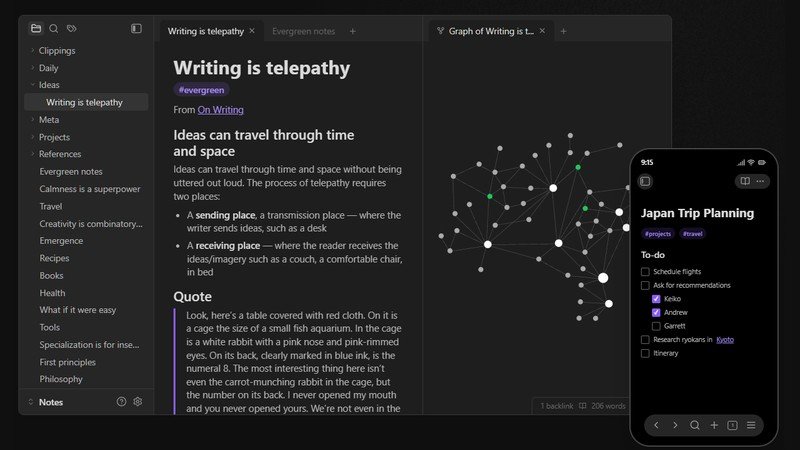
Obsidian is a note taking app and Markdown editor that stores notes as files on your device. Its daily workflow, linked notes, and ability to open individual Markdown files make it a strong choice for writing and reviewing notes. It earns 4.7 out of 5, with setup and optional costs to consider.
Overview
Markdown is a plain text format that uses simple symbols for headings, links, and formatting. Obsidian keeps notes in a vault, a folder on your device. You can open those files in other editors and back them up with your normal tools. The app works offline on Windows, macOS, Linux, iOS, and Android.
Obsidian can replace a separate Markdown viewer. On desktop, version 1.14 opens and edits individual Markdown files outside a vault while leaving them in their original location. You can set Obsidian as the default app for .md files. Obsidian says this requires the latest installer, so download and reinstall it if the option is missing.
Key Features
- Linked Notes: Link notes together and use backlinks to see which notes refer to the current one. Graph view displays connections between notes.
- Search and Organization: Use folders, tags, and properties, which are fields such as project name or status, to organize notes.
- Bases and Canvas: Bases displays notes and their properties in views such as tables or cards. Canvas provides a visual space for arranging notes and other material.
- Templates and Plugins: Templates help you reuse a note structure. Community plugins add features, but each has its own settings and maintenance needs.
- Sync and Publish: Optional paid services synchronize notes across devices or publish selected notes to a website. Sync includes version history and shared vaults.
- AI Workflows: Markdown files can be supplied to a separate AI tool, or you can add a community plugin. Smart Connections uses a local model to find related notes by meaning. It can help gather notes for a separate AI chat.
For an AI review, select project notes and ask a tool to identify recurring issues, open decisions, or themes across meetings. You can compare research notes for common findings or group journal entries by topics you choose. Ask the tool to cite source notes and check its conclusions against them. Local files do not automatically stay local when you send them to a hosted AI service. Review its data handling, plugin permissions, and workplace rules before sharing sensitive notes. AI services or plugins can have separate fees.
Pros and Cons
Pros
- Plain Markdown files remain available outside the app.
- The desktop app can open individual Markdown files outside a vault.
- Links and search help connect notes across subjects.
- The core app is free for personal and commercial use.
- Plugins and external AI tools offer options for reviewing collections of notes.
Cons
- Organizing a vault and choosing plugins take time.
- Official Sync and Publish services cost extra.
- Community plugins can require maintenance and may access note contents.
- Local files still need a separate backup plan.
- Teams that need a shared workspace with extensive administration may need other tools.
Who It's For
Obsidian suits people who write or review Markdown every day, including researchers, writers, developers, and people keeping project notes. Start with a folder and search, then add links or plugins as your notes grow. If your team needs a hosted workspace with detailed permissions and a database built in from the start, compare it with Notion.
Independent reviews from TechRadar and The Computer & Technology Network also highlight local files and linked notes. Their evaluations help frame the tradeoff between flexibility and the time needed to set up a system.
Verdict
Obsidian earns 4.7 out of 5 for its local Markdown files, linking tools, and option to open standalone files as a default desktop viewer. It can serve as a daily editor and a source of notes for AI analysis. The score reflects the work involved in setup, backups, and choosing paid services or plugins.
Rating: 4.7 out of 5
Sources: Obsidian, pricing and opening files outside a vault, and the Smart Connections plugin listing. Pricing and features checked November 2, 2026.
Price and availability
Obsidian's core app is free for personal and commercial use. As of November 2, 2026, the optional commercial license is $50 per user per year. Obsidian encourages organizations to buy it but does not require it for work. Sync starts at $4 per user per month billed annually, or $5 monthly. Publish starts at $8 per site per month billed annually, or $10 monthly. Those services are separate from the commercial license. Prices and plan details can change, so review current options at Obsidian.